HODYLIX Match 0.3 — AI pitch calibration, tactical tools & live NDI

AI football video analysis and broadcast telestration for Windows.

Go from raw match footage to broadcast-grade tactical breakdowns in minutes: automatic GPU pitch calibration, ghost player movement, cover shadow cones, defensive line metrics, AI tracking and live NDI output.

Get HODYLIX Match
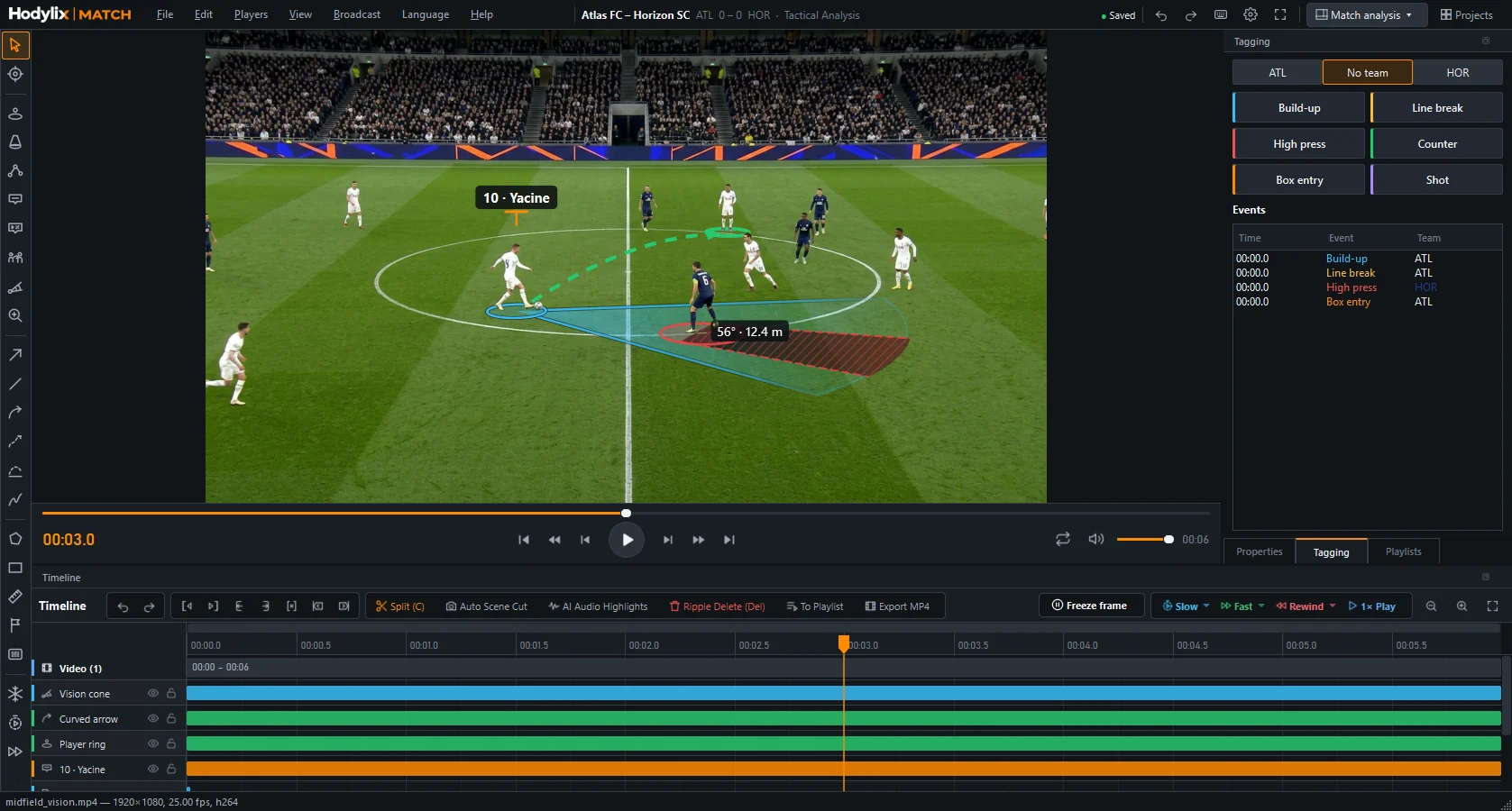
HODYLIX Match English interface showing a calibrated midfield vision cone with red cover shadow, curved pass arrow, player ring and multi-track tactical timeline
Frame-accurateEvery step, cut and drawing lands on the exact frame.
Live NDI outputProgram or graphics with alpha, straight to the vision mixer.
Works offlineActivate once; analyse for weeks without a connection.
Arabic · English · FrenchRight-to-left done properly, not as an afterthought.
Interactive before & after

Drag across the pitch to compare raw footage vs. broadcast telestration.

Real perspective graphics rendered behind the players with automatic AI keying and calibrated metric measurements.

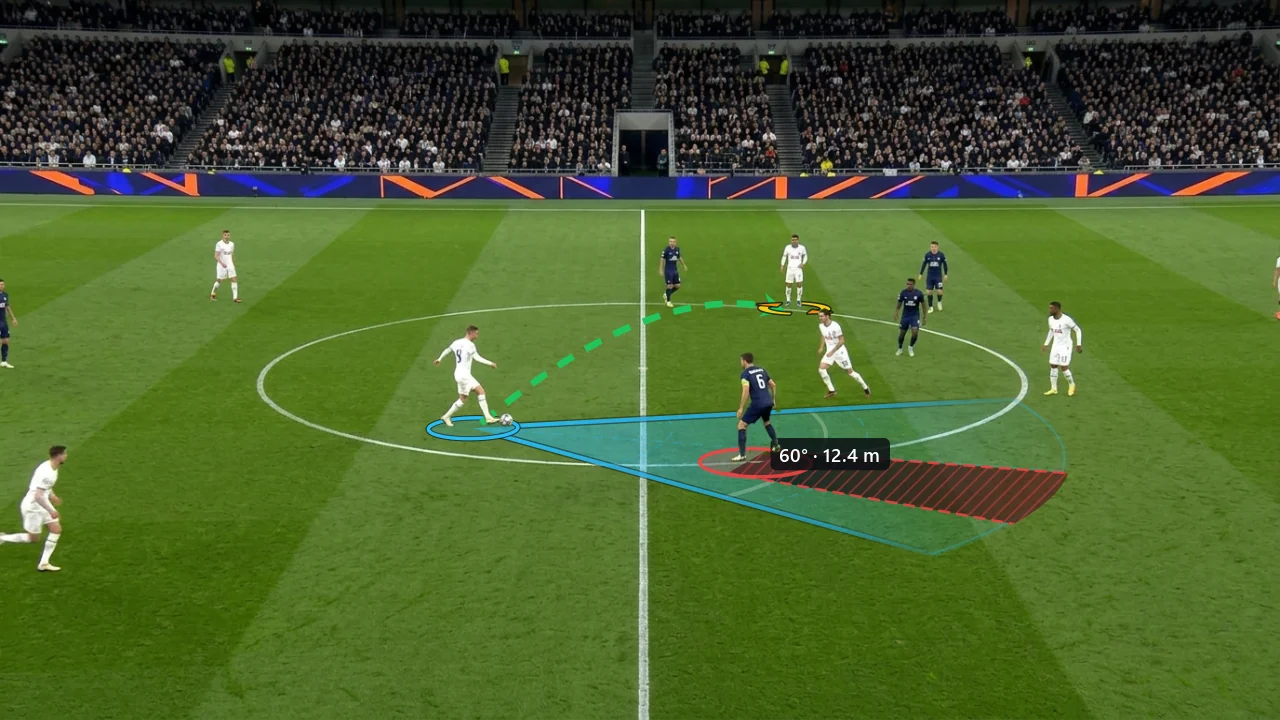
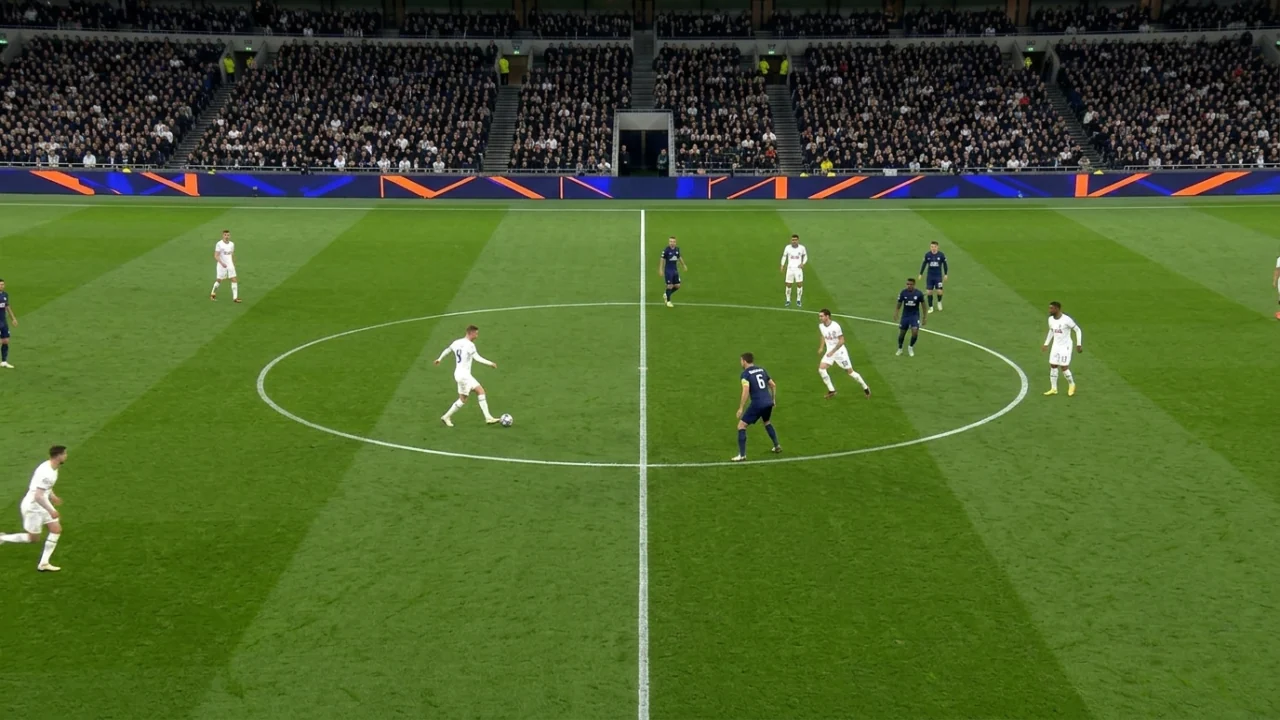
Before and after comparison showing a calibrated midfield vision cone with red cover shadow occlusion behind the defender and green curved progressive passRaw footageHODYLIX Match

Calibrated 60° vision cone composited behind players, geometric red cover shadow cast by the #6 blocker, and curved pass into the open teammate.

The workflow

From match footage to the message, in one place.

Analysis tools usually stop at the timeline. HODYLIX Match follows the work all the way to the screen your players, your staff or your viewers look at.

01

Capture

Open match footage, or record a live NDI source and cut instant replays while the game is on.

02

Analyse

Tag events with your own buttons, track players and the ball, calibrate the pitch and follow the camera.

03

Explain

Draw on the pitch: rings, passes, runs, zones, offside lines, spotlights, freeze frames — all animated in time.

04

Deliver

Export MP4 on the graphics card, build playlists for the dressing room, or send it live to the production.

Who it is for

Video analysis software for analysts, coaches, clubs and broadcasters.

Analysts

Tag a match with your own buttons, track the players who matter and turn the evidence into clips and playlists.

Coaches

Show the idea on the pitch your players know: the space, the run, the line. Clear enough for the dressing room.

Clubs and academies

Give every staff member the same tools and the same language — Arabic, English or French — from the first team to the academy.

Broadcasters

Live NDI output, replays and graphics that sit behind the players: analysis segments without a separate graphics system.

Features

Broadcast-grade AI tools built specifically for football analysis.

Automatic pitch calibration, ghost player movement, cover shadow cones, defensive line compactness, AI tracking, Freeze/Slow/Fast/Rewind time control, timeline editing and live NDI in one native Windows program.

01

AI Automatic Pitch Calibration in One Click

Stop clicking four corners manually on every clip. Press Auto-detect pitch on a penalty-area, goal-area or midfield shot and the onboard DirectML GPU model locks the perspective grid onto the field lines in ~50 ms — ready for camera tracking and exact metre measurements.
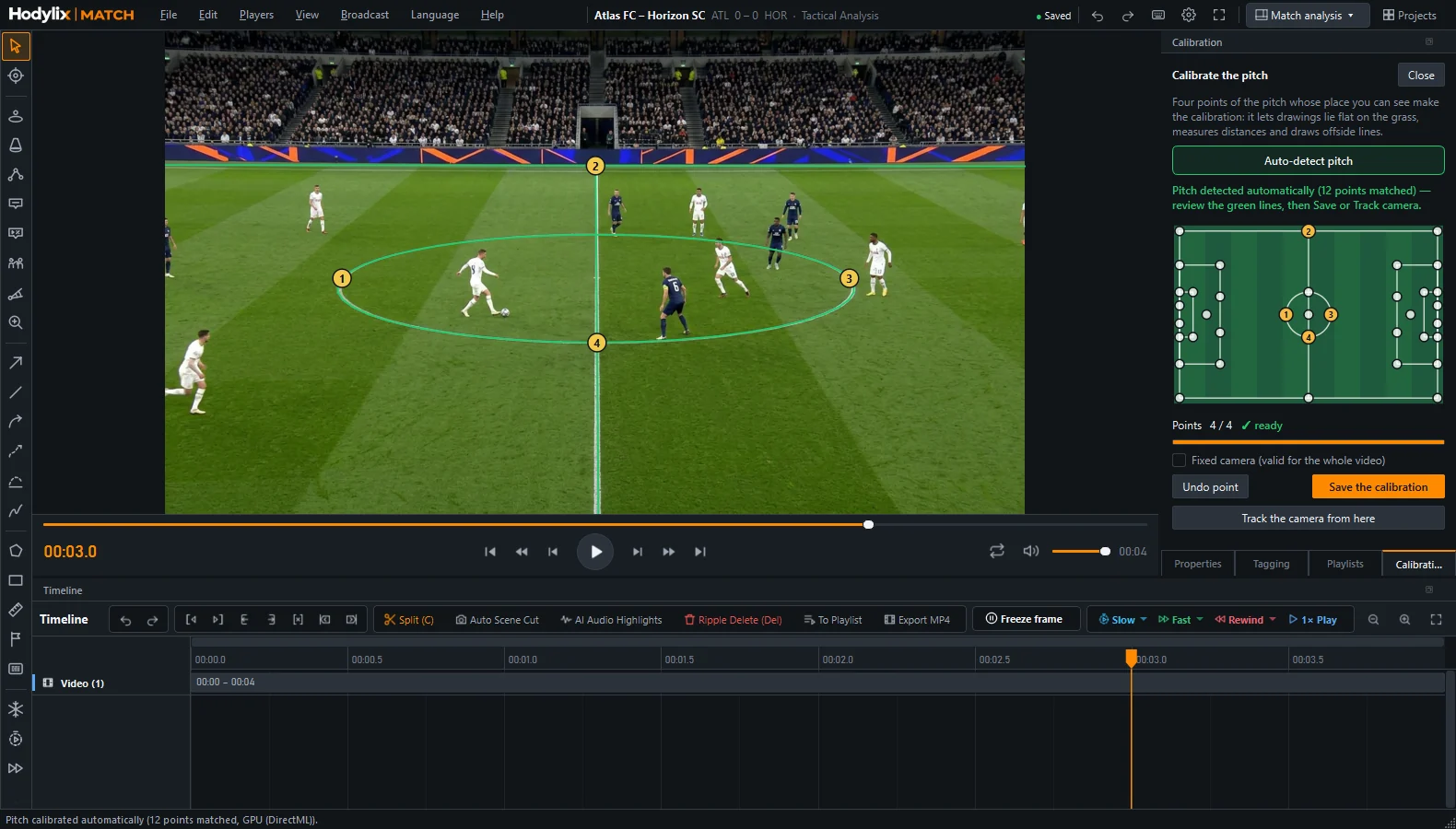
  • One-click penalty box, 6-yard box and midfield line detection (~50 ms on GPU)
  • Automatic 4-point placement with instant manual fine-tuning if needed
  • Follows camera pans and zooms automatically until the shot changes
  • Unlocks true perspective graphics, offside lines and distance in metres
HODYLIX Match English interface with Auto-detect pitch calibration panel open, four numbered yellow points locked onto the penalty box lines and green perspective grid aligned over the pitch
02

Player Move & Ghost Cutout Tactical Simulation

Show what a player should have done instead of drawing static arrows. Click any player and drag them into open space: HODYLIX Match cuts out the player in high resolution, erases the original body with seamless grass inpainting and animates the run.
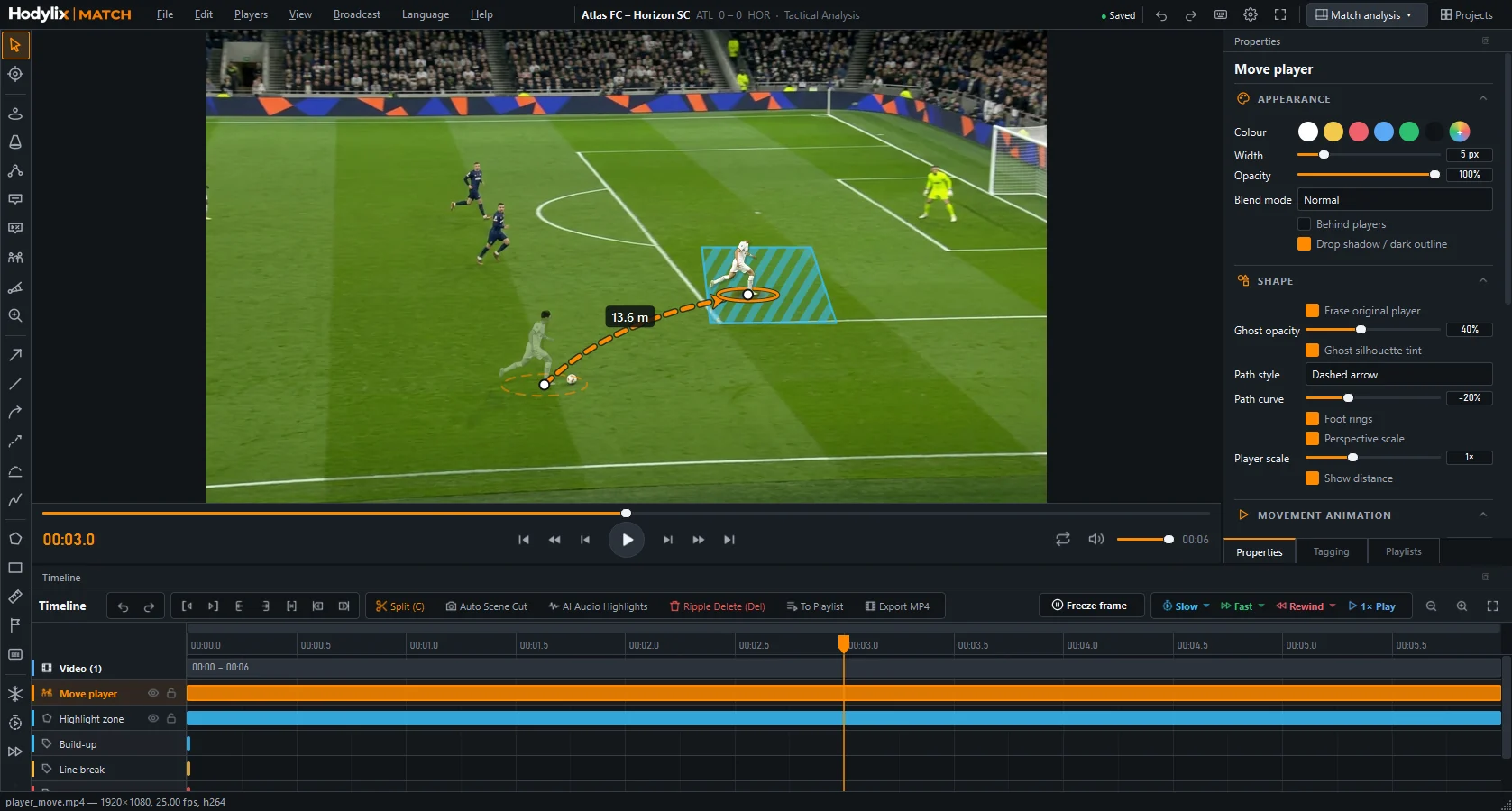
  • High-res 256×256 AI player cutout with green-spill cleanup
  • Seamless grass background erasure at the original position
  • Translucent ghost silhouette, curved dashed/trail paths and foot rings
  • Automatic perspective scaling with Homography and calibrated distance readout
HODYLIX Match English interface demonstrating the Player Move Ghost Cutout tool erasing the original winger on the grass and animating his cutout along a curved dashed path into the penalty box
03

Vision Cone, Passing Corridors & Cover Shadow

Illustrate scanning angles, open passing lanes and pressing traps directly on the grass behind the players. Add a defender blocker handle and HODYLIX Match computes the exact geometric Cover Shadow blocking the pass.
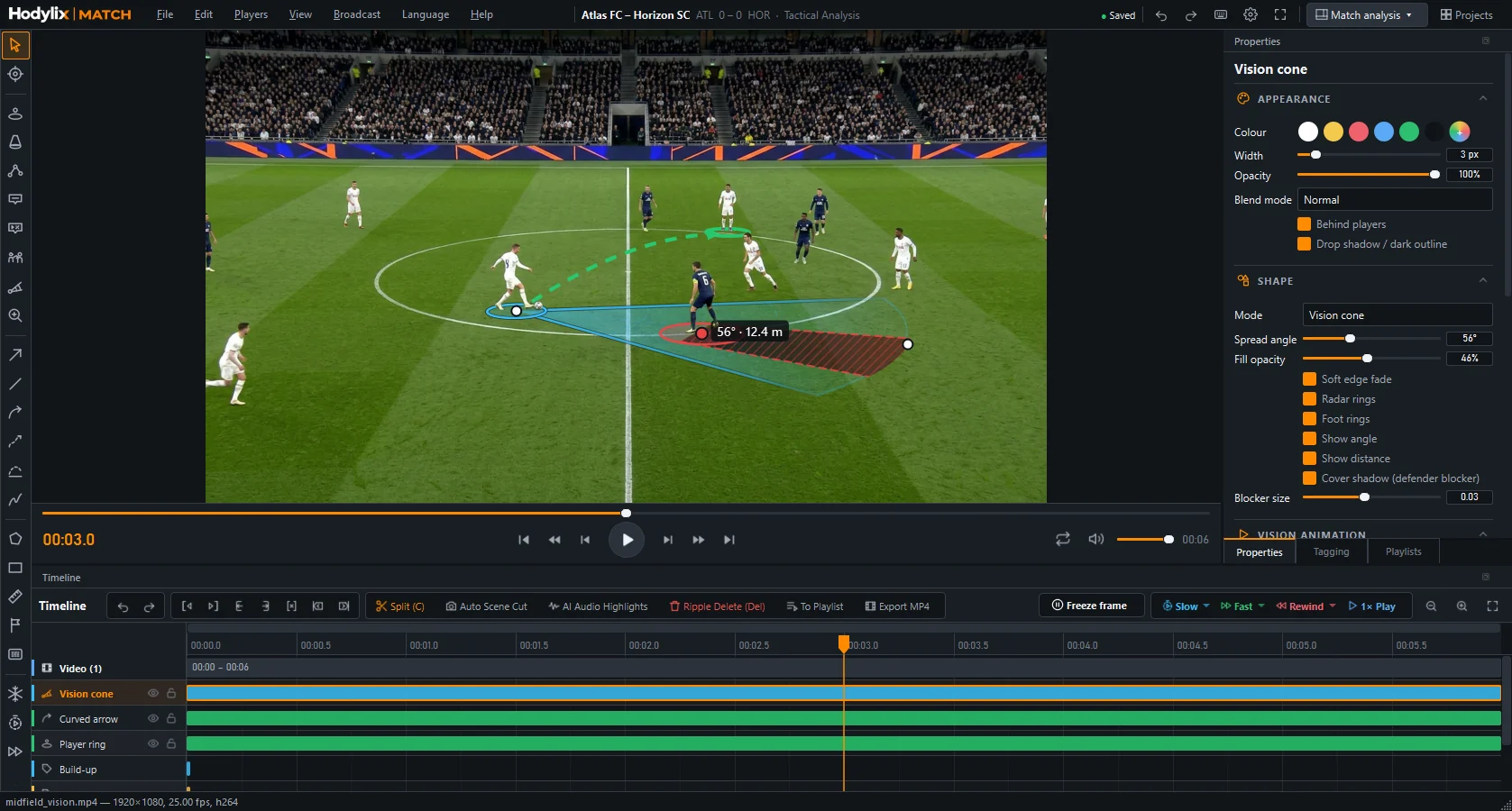
  • Three tactical modes: Vision cone, Passing corridor and Shooting angle
  • Geometric Cover Shadow occlusion polygon cast behind any defending blocker
  • Luminous radar rings, scanning wave animation, angle (°) and distance (m)
  • Smart player tracking that follows ball carriers, teammates and blockers
HODYLIX Match English interface showing a midfield Vision Cone cast behind players with a red defender Cover Shadow blocking the central passing lane and a green open curved pass option
04

Defensive Line & Team Shape Compactness (m²)

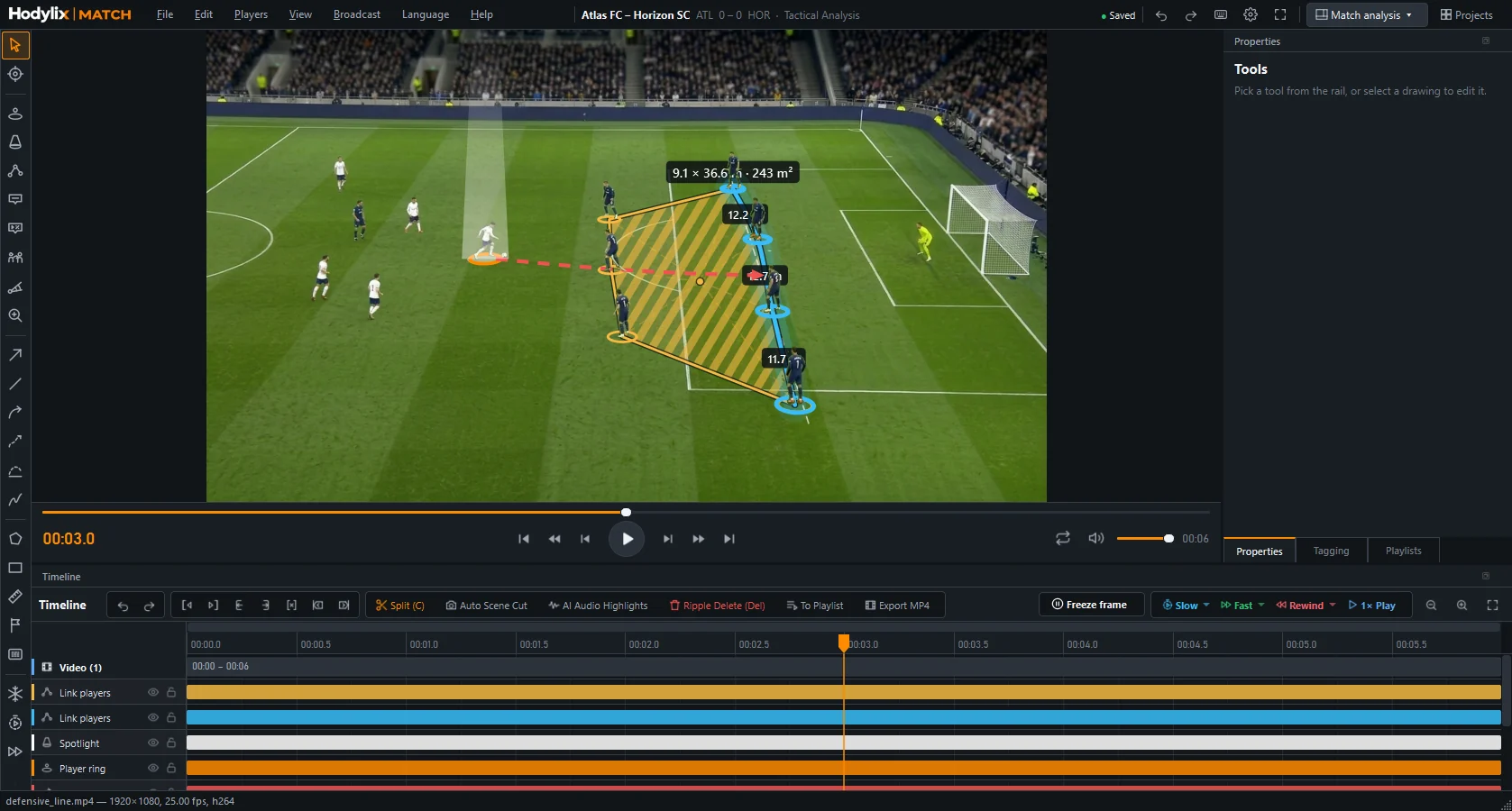
Analyse defensive organisation with live calibrated geometry. Click defenders in any order to build an auto-ordered Defensive Line that flags the widest gap in red, or switch to Team Shape to measure the convex hull block in square metres.
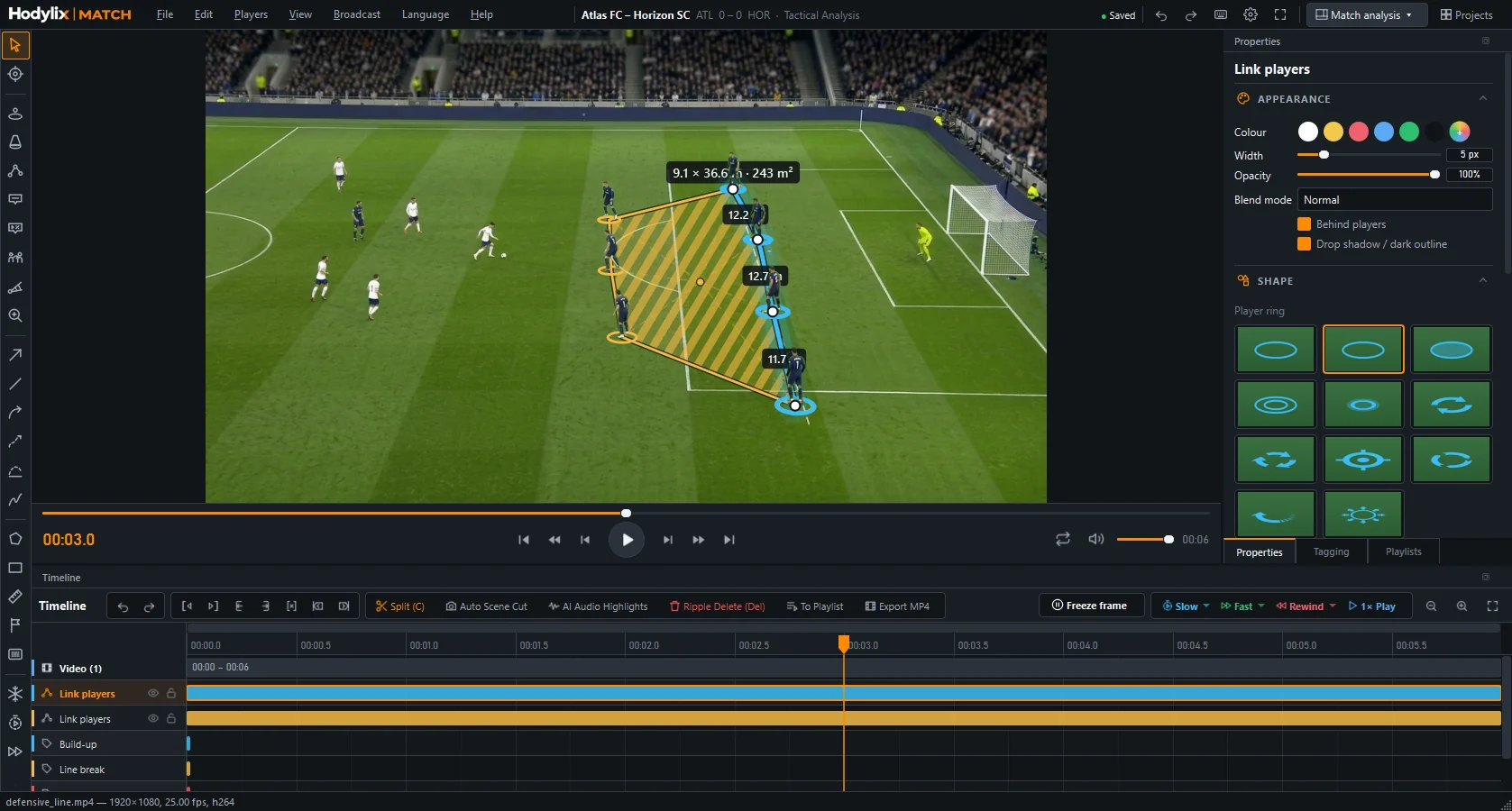
  • PCA auto-ordered Defensive Line with glowing tactical depth band
  • Dashed alignment reference line and offside-breaker deviation markers
  • Automatic red widest-gap alert with live distance in metres for every gap
  • Team Shape Convex Hull with centroid web and live Length × Width · m² card
HODYLIX Match English interface showing an auto-ordered 4-defender Defensive Line highlighting the widest central gap in red alongside a 7-player Team Shape Convex Hull with m² compactness stats
05

3D Lofted Ball Trajectory & Shot Arc Toward Goal with Ground Shadow

Visualise curling shots toward the top corner, free kicks and lofted switches with unmistakable 3D TV depth. HODYLIX Match draws the glowing aerial arc paired with a translucent height curtain, a realistic dark ground shadow running along the grass underneath, a landing target ring and an animated flying ball.
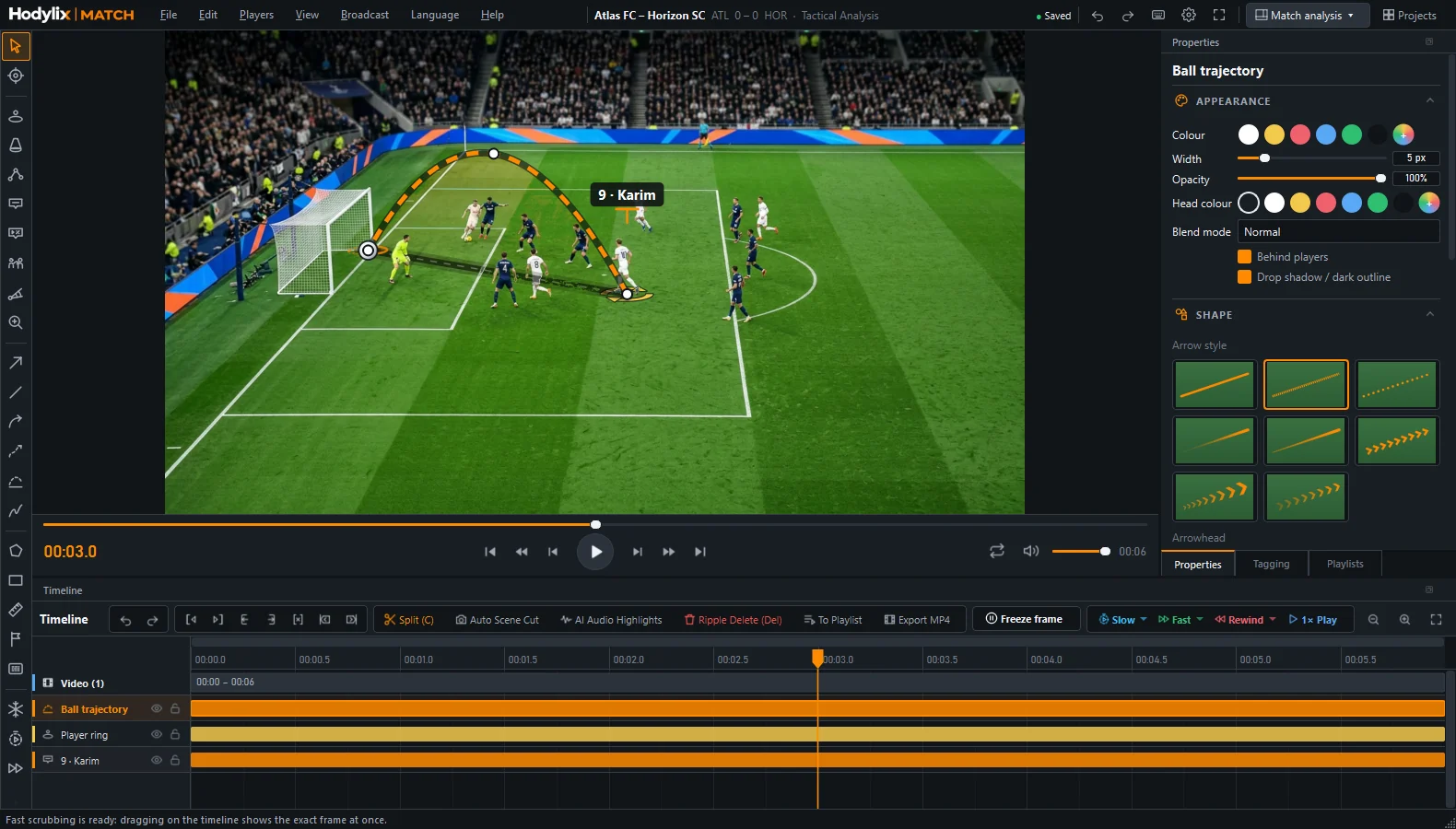
  • 3D aerial arc trajectory for shots toward goal, free kicks and diagonal switches
  • Realistic ground shadow ribbon directly underneath on the grass plus translucent height veil
  • Animated flying ball with matching ground shadow dot and perspective goal landing ring
  • Customizable Draw-in timing, delay and dashed, tapered or chevron broadcast styles
HODYLIX Match English interface showing a glowing lofted shot arc curving toward the goal with its realistic ground shadow running along the pitch underneath and animated ball
06

AI Player & Ball Tracking, Live Counter Progress & Behind-Players Isolation

Click any player with Click-to-Track (T) so the local AI locks on and tracks forward, backward or both ways — with a live progress counter window showing completion percentage and keyframe count, a trajectory Smoothing slider, animated Stat Chrono Counters and TV-grade Behind-Players isolation.
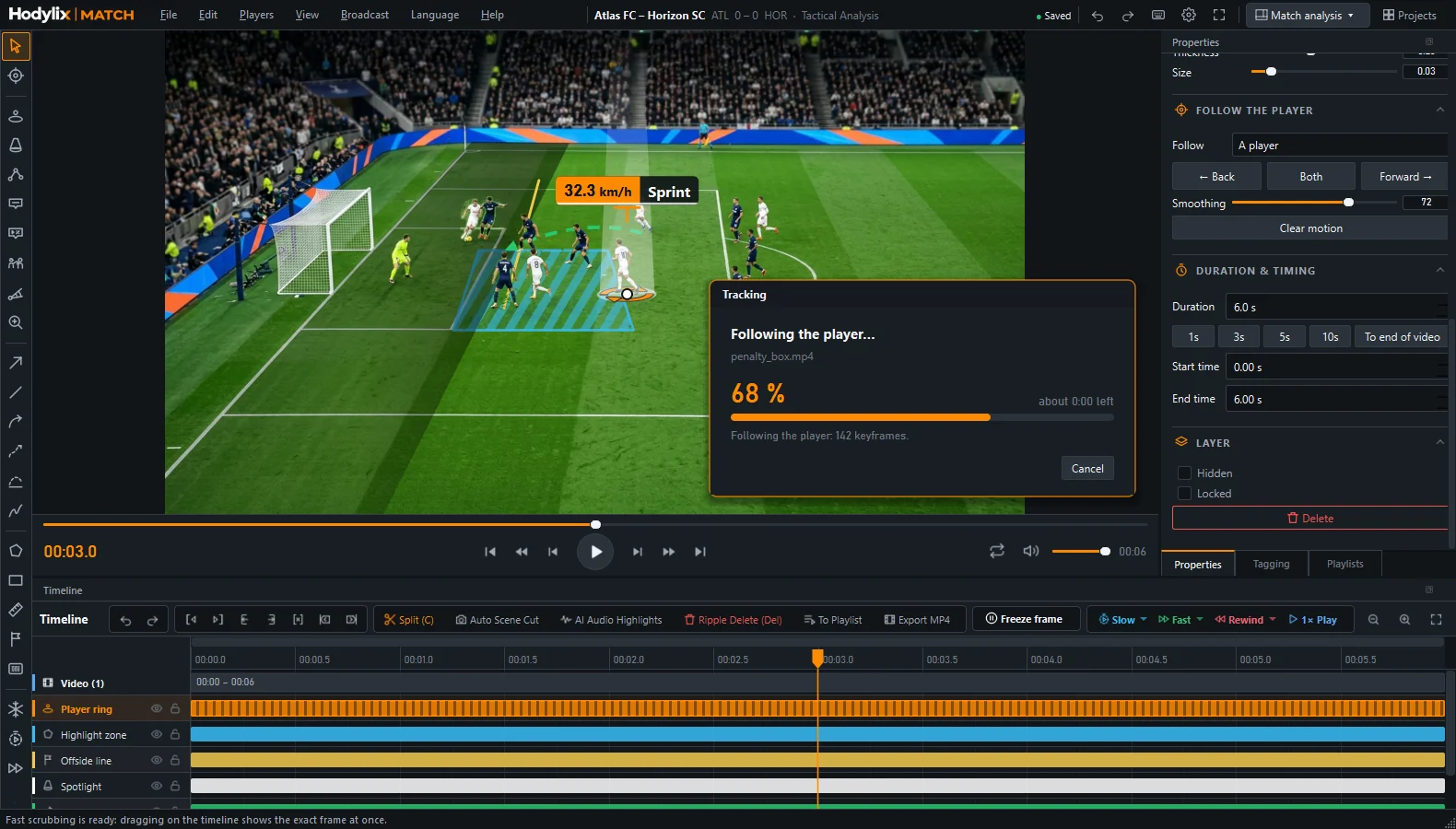
  • One-click AI player & ball tracking (Back, Both, Forward) plus pin-to-pitch camera tracking
  • Live tracking progress slider window with percentage counter, keyframes count and Smoothing slider
  • Tracked Stat Chrono Counters (km/h, %, m, xG) with animated progress bars following the player
  • TV-grade Behind players AI isolation running locally on your GPU so graphics pass underneath
HODYLIX Match English interface showing AI player tracking with the floating 68% tracking progress counter window, Follow the player Smoothing slider, tracked km/h chrono counter and Behind-Players isolation
07

Broadcast Time Control: Freeze Frame, Slow Motion, Fast Forward & Rewind

Control match rhythm like a live TV replay desk directly on your non-destructive timeline. Freeze the exact decision moment while your graphics animate on screen, slow down key touches, speed through build-up, or rewind a sequence backwards to trace a mistake to its root cause.
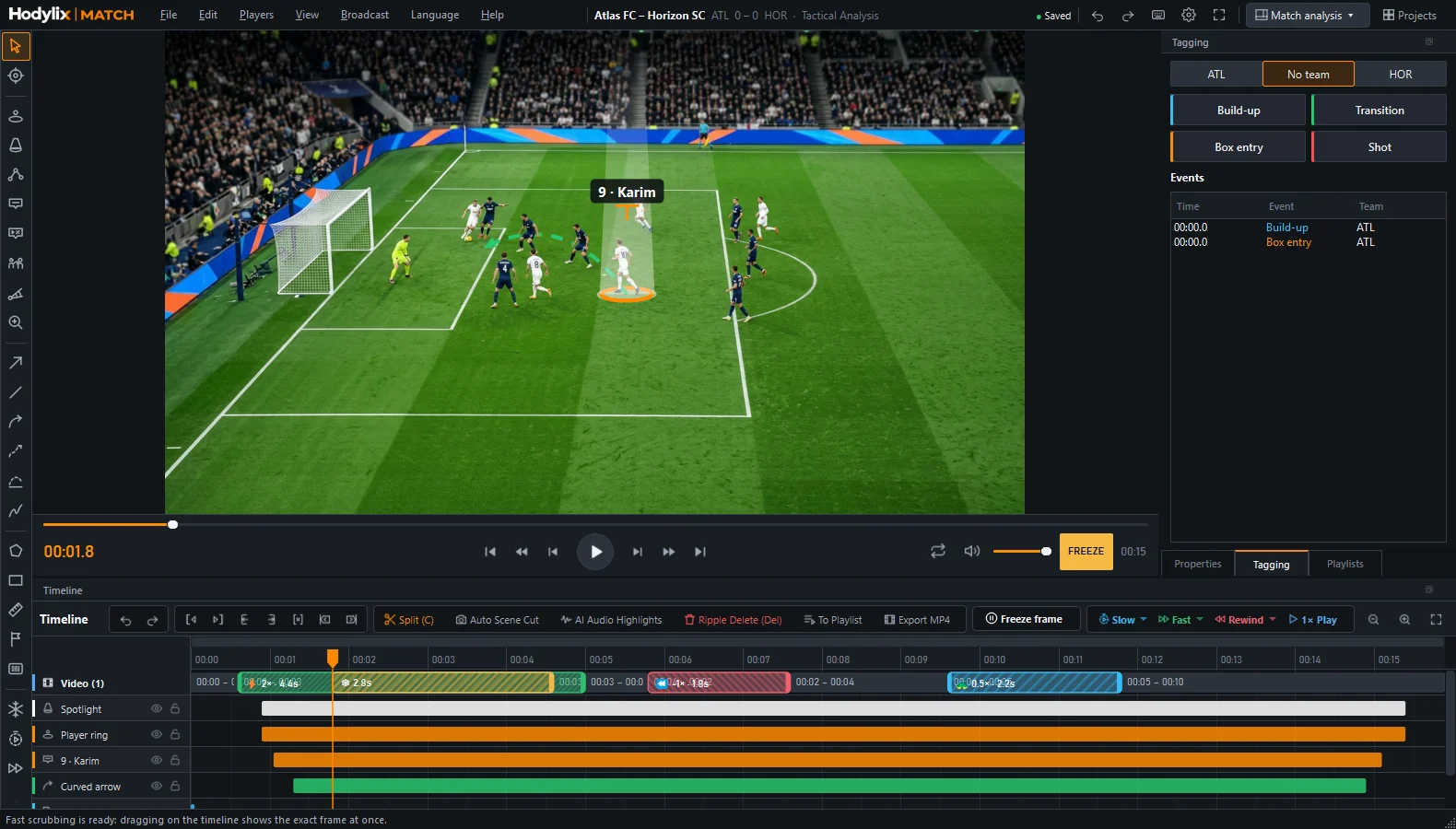
  • Instant Freeze Frame (F) with customizable hold duration while telestration animates over the still
  • Non-destructive Slow Motion (0.25×, 0.5×, 0.75× or custom) and Fast Forward (1.5×, 2×, 4×) regions
  • Smooth Reverse / Rewind playback (-0.5×, -1×, -2×) that rolls the play backwards then continues automatically
  • 1-click studio combos: Rewind then Slow Motion (0.5×) and Rewind then Freeze Frame — live in NDI and 100% GPU MP4 export
HODYLIX Match English interface showing color-coded timeline blocks for 2× Fast Forward, Freeze Frame, -1× Rewind and 0.5× Slow Motion alongside the time-control toolbar
08

Match Tagging, Multi-Track Timeline & 100% GPU Export

Cut full matches into dressing-room presentations or social media breakdowns without leaving the workstation. Tag events with custom football panels, auto-detect scenes and highlights, frame for 9:16 Reels, and export at blistering GPU speed.
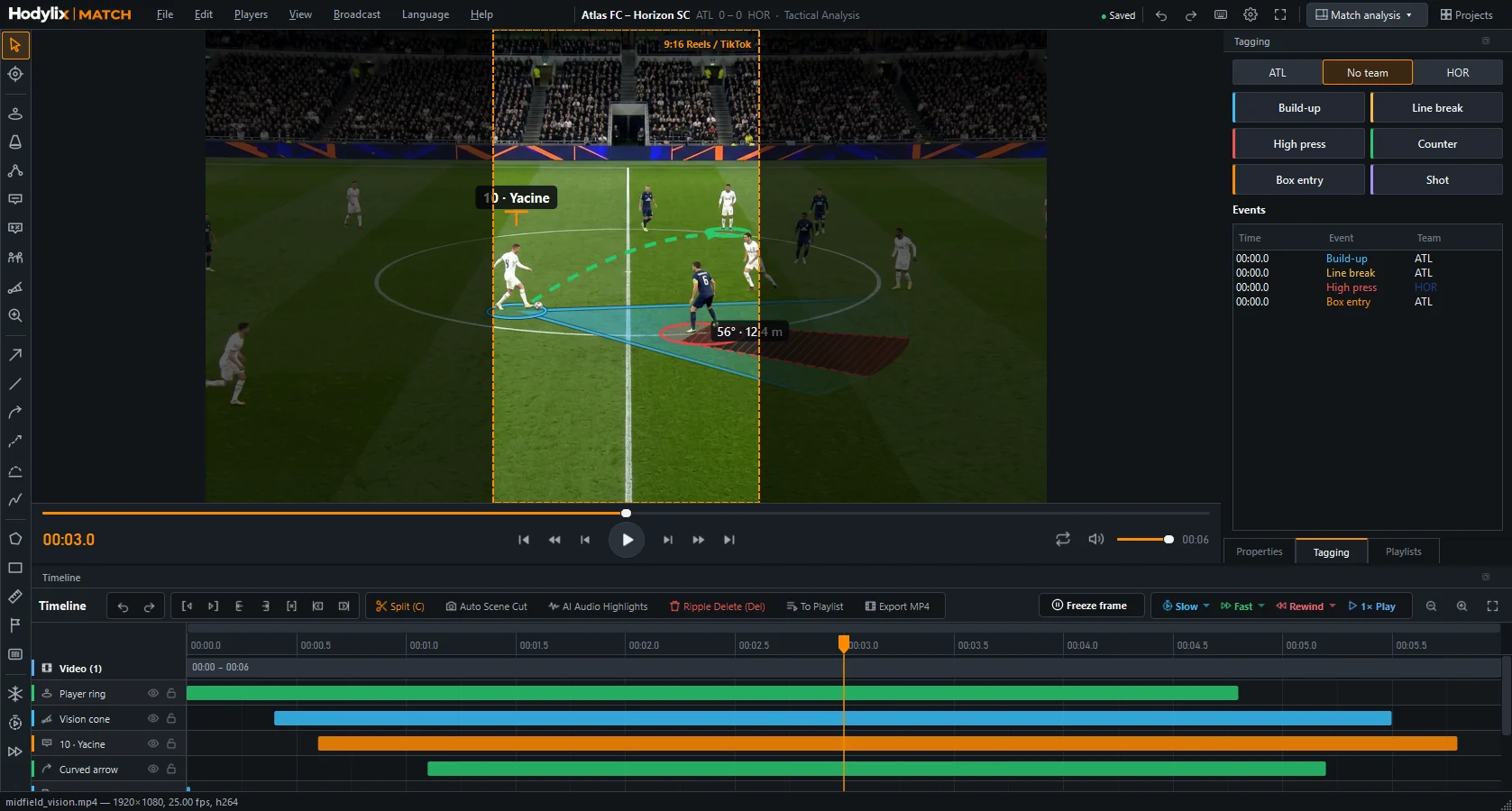
  • Custom football tagging buttons, event timelines and team playlists
  • Automatic scene cuts (Auto Scene Cut) and AI audio highlights detection
  • 9:16 Reels/TikTok, 1:1 Square and 4:3 Broadcast framing guides
  • 100% GPU Zero-Copy D3D11 compositing and hardware-accelerated MP4 export
HODYLIX Match English interface showing the multi-track tactical timeline, custom football tagging buttons and 9:16 social media framing guide
09

Live NDI Broadcast Production & Multilingual RTL Interface

Built for live sports studios and outside-broadcast vans. Output Program or Graphics + Alpha Key straight to your vision mixer, trigger instant replays with F8, and switch seamlessly between Arabic (true RTL), English and French.
  • Live NDI Program and Fill+Key (alpha) output with ON AIR tally
  • Built-in NDI segment recorder and 1-key instant replays (F8)
  • Native Arabic (right-to-left), English and French UI and drawing tools
  • Works offline for weeks on any Windows 10/11 DirectX 12 workstation
HODYLIX Match English interface in live studio broadcast mode with ON AIR NDI tally indicator and real-time tactical overlays
Licensing

A license that respects your work.

Activate with a key. The license is signed by HODYLIX and kept on your computer, so the program works for 30 days without a connection — or for the whole subscription with offline activation. When a license ends, your projects still open, play and export.
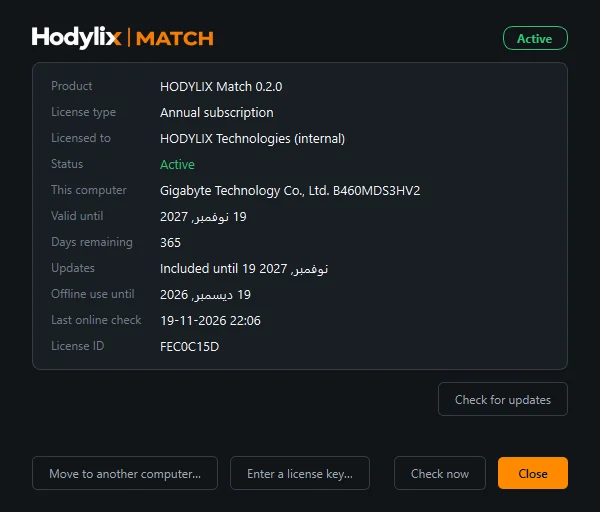
  • Online or offline activation
  • Move to a new computer by yourself
  • Read-only, never locked, when a license ends
  • Check for updates covered by your license
The license window of HODYLIX Match
System requirements

What you need.

Operating system
Windows 10 or 11, 64-bit
Processor
Quad-core, 2018 or newer (8 cores recommended for 4K)
Memory
8 GB minimum, 16 GB recommended
Graphics
DirectX 12 graphics card (AI pitch calibration, isolation & GPU export); NVIDIA recommended for hardware encoding
Storage
2 GB for the program and AI models, plus your footage
Live production
NDI 6 Tools (free) for NDI output and recording
Display
1920 × 1080 or larger
Release notes

What’s new in 0.3.

0.3.0
  • AI Automatic Pitch Calibration (Auto-detect pitch): detects field lines in ~50 ms on DirectML GPU
  • Player Move (Ghost Cutout): high-res AI cutout, seamless grass erasure, ghost trail and perspective scaling
  • Vision Cone & Passing Corridor with geometric defender Cover Shadow occlusion
  • Link Players tactical upgrade: auto-ordered Defensive Line (widest-gap alert) & Team Shape Convex Hull (m² compactness)
  • 3D lofted ball trajectory & shot arcs toward goal with realistic ground shadow, height veil, flying ball & landing ring
  • AI player & ball tracking with live progress counter window, Smoothing slider & tracked Stat Chrono Counters (km/h, %, xG)
  • Broadcast timeline time control: Freeze Frame (F), Slow Motion (0.25×–0.75×), Fast Forward (1.5×–4×), Reverse/Rewind (-0.5× to -2×) & 1-click Rewind-then-Slow-Mo/Freeze combos
  • 100% GPU Zero-Copy D3D11 export pipeline and Click-to-Track AI player snapping
  • Live NDI Program & Alpha Key output, NDI recorder and F8 instant replays

HODYLIX Match: frequently asked questions

What is HODYLIX Match?

HODYLIX Match is native Windows football video analysis and telestration software used by performance analysts, coaches, clubs and TV broadcasters to calibrate pitches automatically, draw broadcast tactics, control playback time, track players and export or air clips live.

How do Freeze Frame, Slow Motion, Fast Forward and Rewind work?

All four are non-destructive timeline blocks: press F to freeze a frame while animated graphics draw in, drop Slow Motion (0.25×/0.5×/0.75×), Fast Forward (1.5×/2×/4×) or Reverse/Rewind (-0.5×/-1×/-2×) regions — or trigger 1-click Rewind-then-Slow-Mo and Rewind-then-Freeze combos — seamlessly preserved in playback, live NDI and MP4 export.

How does AI automatic pitch calibration work?

On any broadcast shot showing penalty-area, goal-area or midfield lines, click Auto-detect pitch. The local DirectML GPU model detects the field intersections in ~50 ms, locks the green perspective grid and lets you track camera motion immediately.

How does Player Move (Ghost Cutout) erase the original player?

HODYLIX Match segments the player in high resolution with a local AI model, fills the vacated spot with seamless surrounding grass texture, leaves an optional translucent ghost silhouette and animates the player cutout along your chosen curve.

Can it measure defensive gaps and team compactness in square metres?

Yes. Once the pitch is calibrated, Defensive Line mode measures every gap between defenders in metres (highlighting the widest gap in red), while Team Shape mode computes the team Convex Hull length, width and live area in m².

Can I draw Vision Cones with defender Cover Shadows behind players?

Yes. Vision Cones, Passing Corridors and Shooting Angles sit flat on the pitch behind players via the AI isolation matte, and adding a blocker handle casts a real geometric tangent Cover Shadow behind the defender.

Can I use HODYLIX Match for live TV production?

Yes. HODYLIX Match outputs live Program or Graphics + Alpha Key as an NDI source with ON AIR tally, includes a built-in NDI recorder and opens instant replays (F8) directly into analysis.

Which computer do I need?

Windows 10 or 11 (64-bit), 8 GB RAM (16 GB recommended) and a DirectX 12 GPU; an NVIDIA graphics card is recommended for fast hardware NVENC export.

Does it work offline without uploading my match videos?

Yes. Every AI model runs locally on your PC, the license works offline for weeks (or full term with offline activation), and your footage never leaves your computer.